

Training log for iPhone and Apple Watch

Archery, cleanly recorded.

Score the end, keep shooting. ArrowNotes records training and competition, analyses it and manages your equipment. Without the clutter.

Free, no subscription, no account.

Round list grouped by monthRound list grouped by month
ArrowNotes overview with recent rounds, arrow count and trendsArrowNotes overview with recent rounds, arrow count and trends
Statistics with score shares and distributionStatistics with score shares and distribution
  • $0Free, no subscription
  • No accountNo sign-up
  • OfflineWorks without a network
  • 4 languagesEN · DE · FR · ES
  • iOS 18.2+iPhone and Apple Watch

Features

Everything for training and competition.

Three ways to score. Rounds with any number of sections. Set-system matches. And analysis that shows where you're heading.

Score the way that suits you

Tap the hit directly on the target face; a loupe shows what your finger hides. Prefer typing? Use the keypad. Photographed the target? Place the markers on the photo.

  • Target face, keypad or target photo
  • WA/FITA 10, 5 and 6 rings, 3-spot, WA field
  • Free training without a fixed number of ends
Recording an end on the target faceRecording an end on the target face

A photo instead of a scorecard

Photograph the face, tap the ring value, drag the marker onto the arrow. The photo stays with the end.

Recording scores directly on the target photoRecording scores directly on the target photo

Shot at an angle? No problem.

The perspective correction lays a template over the photo. Afterwards the markers are real positions on the face.

Calibration template on the target photoCalibration template on the target photo

Competition and matches

Olympic set system and compound scoring for individual, team and mixed. With shoot-off on a tie.

Match scoring with set points and set listMatch scoring with set points and set list

See where you hit

Group centre and spread in centimetres, separately per face, so the numbers are right.

Hit pattern with group centre and spreadHit pattern with group centre and spread

Rounds with sections

Each section with its own face, size and distance, from the WA 1440 to a field round.

Round with four sections at 90, 70, 50 and 30 metresRound with four sections at 90, 70, 50 and 30 metres

Equipment and setups

Bows, limbs, sights and arrows. Several setups per bow, sight marks per distance. Recurve, barebow, compound and longbow.

Timer and arrow counter

Shooting time with preparation, shooting and warning, haptic and audible. Count arrows outside of rounds, day by day.

Personal profile

Optional: name, club and profile picture. In a match your first name then appears instead of “Me”.

Target photo

Photograph the target. Done.

No copying, no scorecard. One photo per end, tap the ring value in the palette, press and hold to lift the marker and place it precisely with the loupe. The values feed into the total and the statistics, the photo stays as evidence.

  • One photo per end, instantly visible in the end list
  • Perspective correction with five handles and an automatic suggestion
  • Works even with the outer edge cut off; if the angle is too steep, the app declines instead of guessing
Recording scores directly on the target photoRecording scores directly on the target photo

Competition

Matches, the way they're shot.

The Olympic set system and cumulative compound scoring are built in, as individual, team and mixed team. The round shows the set score, all sets and the winner; on a tie the shoot-off follows.

  • Six WA formats, sets and arrows follow the format
  • Enter the opponent's set total while scoring
  • Shoot-off including who was closer to the centre
Match scoring with set points and set listMatch scoring with set points and set list

Statistics

Progress you can see.

Score shares, distribution and averages per end, round and distance, filtered by period, type and location. Trends compare the last three months with the three before, separately for indoor and outdoor.

  • Statistics across all rounds or per round
  • Average score per arrow, end, round and distance
  • Personal bests per round type and distance
Statistics with score shares and distributionStatistics with score shares and distribution

Apple Watch

The remote on your wrist.

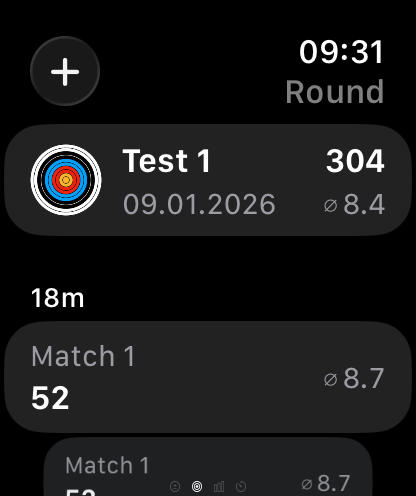
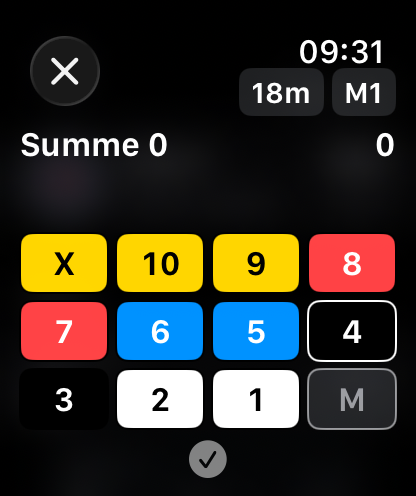
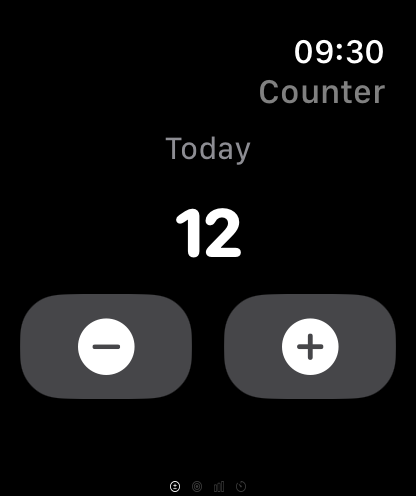
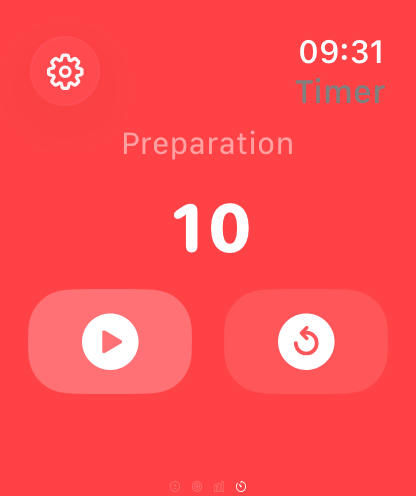
Record ends, keep the counter running, start the timer, check statistics. The iPhone stays in your pocket.

  • Latest round on the Apple Watch
    Latest round
  • Recording an end on the Apple Watch
    Record an end
  • Arrow counter on the Apple Watch
    Arrow counter
  • Timer on the Apple Watch
    Timer

Awards

39 reasons to keep going.

Target pins following the World Archery thresholds, stars for the WA 1440, milestones for arrows and rounds, special hits and consistency. Only fully shot rounds count.

All awards

Your data

Stays yours.

ArrowNotes is built as a local training log. No account with the developer, no tracking, no ads.

Stored locally

Everything lives on your device. Without sync, not a single record leaves the iPhone.

iCloud optional

If you want, your private iCloud account keeps iPhone and Watch in sync, with your Apple ID and no sign-up.

Export and import

Back up your data as a file and restore it. Where the file goes is up to you.

No analytics

The app collects no analytics or usage data. The data donation for arrow detection is voluntary and off by default.

FAQ

Quick answers.

The most common questions about price, account, photos and backup. Everything else is in the FAQ and the manual.

All questions
What does ArrowNotes cost?

Nothing. Every feature is free: no subscription, no running costs, no ads. There is no limit on the number of rounds either.

Do I need an account?

No. ArrowNotes stores your data on the device. Only if you enable iCloud sync is it also kept in your private iCloud account. Your Apple ID is all it takes.

Are my photos uploaded anywhere?

No, they stay on your device and, if you enabled sync, in your private iCloud account. Only the voluntary training data donation uploads the corrected crop of the target face anonymously, revocable at any time.

Can I export my data?

Yes, in the settings, as a file. Importing restores that state and replaces all existing data. Target photos are deliberately not part of the file, but they are synchronised via iCloud.

Next end, cleanly noted.

ArrowNotes is free on the App Store, with no subscription and no account.

Download on the App Store Download on the App Store

Requires iOS 18.2 or later · Apple Watch optional, watchOS 11.6 or later